Home › Roblox Game Codes › Roblox +1 Speed Keyboard Escape Codes (November 2026)
Roblox +1 Speed Keyboard Escape Codes (November 2026)
Looking for the latest +1 Speed Keyboard Escape Codes? If you’re trying to move faster, escape obstacles more efficiently, and rack up wins in this Roblox obby experience, you’ll want to take advantage of every available speed boost.
+1 Speed Keyboard Escape challenges players to dodge hazards, outrun enemies, and navigate obstacle-filled courses while continuously increasing their movement speed. Since speed is the most important stat in the game, redeeming exclusive codes can provide a useful advantage when progressing through tougher stages.
Here’s everything you need to know about active codes, how to generate them, and why they may not be working.
All New +1 Speed Keyboard Escape Codes
Redeem these active codes before they expire:
- STEAKTREADMILL: Treadmill Skin (NEW)
- SAMMYLOOSER: 1x Strawberry Milkshake (NEW)
The game also uses an exclusive code system that allows players to generate unique redemption codes through the official Discord server.
| Code Type | Reward |
|---|---|
| Exclusive Generated Code | Free Speed Boost Rewards |
To claim these rewards, you’ll first need to generate a personal code through the game’s Discord community.
Expired +1 Speed Keyboard Escape Codes
Currently, there are no expired +1 Speed Keyboard Escape codes.
- No expired codes currently available.
How to Redeem +1 Speed Keyboard Escape Codes
Redeeming rewards in +1 Speed Keyboard Escape is a little different from most Roblox experiences.
To generate a personal code, create one through the official Discord server.
Generate and Redeem a Code
- Join the official SecretVerse Studio Discord server.
- Open the #social-code channel.
- Click the Get Code button.
- Copy the generated code.
- Launch +1 Speed Keyboard Escape on Roblox.
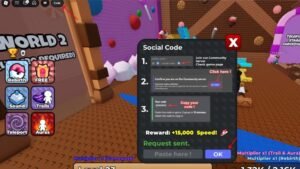
- Click the Code option in the upper-left corner of the screen.
- Paste your generated code into the Paster here! box.
- Press OK to redeem the reward.
After successfully using a generated code, you’ll need to wait five minutes before creating another one.
How to Get More +1 Speed Keyboard Escape Codes
Active +1 Speed Keyboard Escape codes are released through official community channels, and you can also generate personal codes through the Discord code-generation system described above.
To stay informed, keep an eye on:
- Official Discord server
- Developer announcements
- The game’s X (formerly Twitter) account
- Major update releases
- Community events
You can also bookmark this page and check back regularly, as we’ll update the list whenever new public codes become available.
Why Are My +1 Speed Keyboard Escape Codes Not Working?
If you’re having trouble redeeming a code, several factors could be causing the issue.
The Code Has Expired
Generated codes are only valid for 15 minutes. If you wait too long before redeeming one, it will no longer work.
Cooldown Timer Active
After generating and redeeming a code, there’s a mandatory five-minute cooldown before another code can be created.
Incorrect Code Entry
A small typo can prevent the code from being accepted. Since generated codes are unique, it’s best to copy and paste them directly.
Expired Generation Window
If the generated code was created earlier and left unused for too long, you’ll need to return to Discord and generate a fresh one.
More Roblox Codes You Should Check Out
Looking for more Roblox freebies? Check out these code guides next:
Many Roblox obby, simulator, and racing games regularly release free boosts, currencies, and exclusive rewards through redeemable codes.
Conclusion
That’s everything you need to know about +1 Speed Keyboard Escape Codes. While the game offers a Discord-based code generation system in addition to traditional public promo codes, players can still claim valuable speed boost rewards through exclusive codes.
Remember that generated codes expire after 15 minutes and require a five-minute cooldown between uses. We’ll keep this guide updated with the latest rewards.